•••
9 min read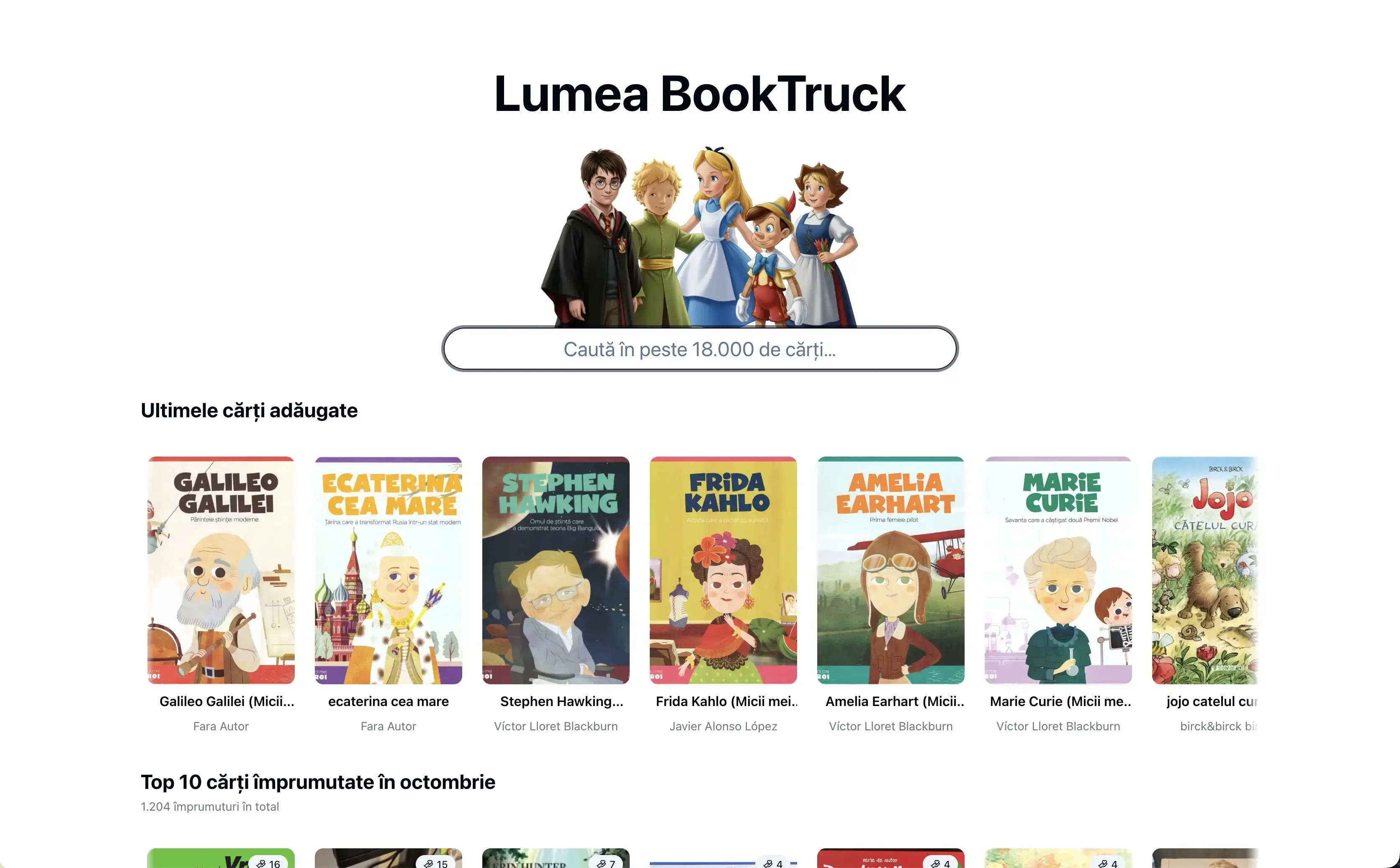
Next.js · Pro-bono · NGO
Lumea BookTruck — catalogue, stock, loans and field uploads for a mobile library
lumea.booktruck.ro ↗1 month ago
Context
BookTruck is the mobile library of Cărțile pe Față, the reading association whose IT infrastructure I've looked after pro-bono for years. The trucks lend books to children in rural schools, so behind every trip there is stock to track, loans to record, returns to chase — and a lot of photos and videos.
Lumea BookTruck is the app that holds all of that together. The public side is a searchable catalogue of the books that travel with the trucks. The panel is where admins, librarians and volunteers do their day-to-day work, from a desk or from a phone in a school courtyard.
The problem
Two things were scattered. The catalogue, stock and loans to schools lived partly in spreadsheets and partly in people's memory: it wasn't clear how many copies of a book were in the truck and how many at headquarters, or how many were still at a given school. And the media from each trip ended up, in the association's own words, chaotically in a WhatsApp group — compressed, unsorted and impossible to find a month later, even though the organisation already had plenty of Google Drive space.
What I built
- A public catalogue. Search finds books by title, author or ISBN, with or without Romanian diacritics, and the search box shows how many books, authors and genres the library holds. The front page also lists the latest additions, the most borrowed books of all time and a top 10 for the previous month. Every book has its own page with the cover, authors, ISBN, language, page count and recommended age.
- The catalogue in the panel. Books, authors, genres and schools, in tables you can search, sort and page through, choosing which columns to show. A book's stock is split by location, and the loan and return lists export to CSV.
- Fast book entry. ISBN barcodes are scanned with the phone camera, right in the browser. The scanner only looks for the barcode formats printed on books, and on iPhones with several cameras it picks the back camera that can focus up close and remembers the choice. For a new ISBN, the title, author, page count, language and cover fill themselves in from Goodreads. If the ISBN is already in the catalogue, the panel warns you. Covers are resized and converted in the browser before upload and get a blurhash placeholder.
- Loans and returns from one window. The "Loan / Return" button opens a window where you scan or type the ISBN, pick the location, the school and the quantity, and confirm. It remembers the last choices, because a whole school visit uses the same ones, and after each book it's ready for the next. On a return you see how many copies of that book the school still has. A return is split automatically across the oldest open loans and can go back to a different location than the one the book left from, with the stock moving along with it. Quantities are checked on the server against the available stock and against what is actually still on loan.
- State changes. Librarians can mark copies as donated or recycled, with a note. They leave the stock but stay in the book's history.
- Locations. The BookTrucks, the headquarters and the other places books live are records that admins manage, each with its own order and chart colour. A location that is no longer used is retired rather than deleted, so the history stays readable. All the stock of one location can be moved to another in batches of 20 books, with a progress bar. If the move is interrupted it can simply be resumed, and every book moved gets a history entry.
- Every book's history. Its creation, edits, stock changes, state changes, loans and returns appear in one list, and admins can download it as CSV.
- The dashboard. New books, loans and returns over the last 30 days compared with the 30 before, a chart of loans and returns over the last 90 days, how the books are spread across locations, the top loans, overall stats, the team members, a summary of volunteer uploads and the last 100 transactions.
- Volunteer upload sessions. An admin creates a session with a label and an expiry date, by default the same time the next day. That creates a subfolder in the association's Shared Drive and a long random link, copied with one click. Volunteers open the link on their phone, with no account, and optionally type their name, which the page remembers. They can pick files or drop files and whole folders anywhere on the page. The page accepts photos and clips, including iPhone HEIC and MOV, and explains why it rejects files that are the wrong type, empty or already added. Every file has its own progress bar, with messages that change along the way ("The BookTruck is rolling with your photos…"). Failed files can be retried one by one or all at once. A countdown that stays on screen shows how long the session is still open and switches the page to "expired" without a reload. While an upload is running the screen stays awake, and closing the page asks for confirmation. In the panel, each session shows its file count, total size, average speed and file list, and can be closed or extended at any time.
- The team. Admins send email invitations with a role set in advance. An invitation expires, can be resent (which cancels the old one) or revoked. Whoever accepts it fills in their profile and lands straight in the panel. Admins can also change roles, ban an account temporarily or permanently with a reason, and temporarily act as someone else to reproduce a problem, with a visible banner while they do. An activity log keeps invitations, role changes, profile edits, bans, sign-ins and impersonations. Avatars show a green dot for whoever is online, and a notification pops up when a colleague comes into the panel.
- Your own account and theme. Everyone edits their name, phone and avatar and picks a light, dark or system theme.
Permissions are a matrix per resource (books, stock, loans, returns, authors, genres, schools, locations, stats, team, gallery) for three roles. Volunteers browse the catalogue and record loans and returns. Librarians manage the whole catalogue, state changes included. Admins also handle schools, locations and stock moves, history exports, upload sessions and the team. Every action is checked on the server, and the menu hides the sections your role can't use.
Under the hood
The interesting decision is in the uploads. Files never pass through the server. The server only opens a Google Drive resumable upload session with a service account and hands its URI to the browser. The browser then sends the file in 8 MB chunks, at most three files at a time so the phone's connection isn't saturated. If the connection drops or stalls, the upload doesn't start over: the browser backs off a little longer between attempts, asks Drive how much it already has and carries on from there. Any progress resets the retry budget, so a long clip on a flaky connection keeps going as long as it moves forward. Proxying the files would have hit the 4.5 MB request-body limit and the timeouts of Vercel Functions. Volunteers never get access to the Drive, each session has a storage cap, and every completed file is logged (name, type, size, duration), which feeds the panel's stats.
Stock is kept per book and location, with two numbers: how many copies the location holds and how many are available right now. A loan only lowers the available count, and a return to a different location moves the copies from one stock to the other. Locations are referenced by an identifier that never changes, so old loans and logs stay correct after a location is renamed or retired. The arithmetic for moving a whole location is a pure function, tested without a database.
Authentication moved from Supabase Auth to Better Auth with passwordless magic links and sign-up disabled. I kept every existing user id and foreign key with an additive backfill, so nothing had to be remapped. Sending links is rate limited in Redis per email address and per IP, because every email costs credits. The admin role can't be granted, changed or impersonated from the app, only in the database. Supabase now only stores book covers and avatars, with every write done on the server after a permission check.
Redis also caches the catalogue stats, refreshed weekly, and last month's top, generated on the first visit of the new month with no cron. It carries the presence heartbeats too: one every two minutes, so a small team stays comfortably within a free plan. If Redis is missing, the features that need it are skipped and the rest of the app carries on. Schema changes are hand-written SQL migrations, and every date is pinned to Europe/Bucharest so the server and the browser always show the same time. The core rules — permissions, stock moves, invitations, logs, the history export and the validation of the loan and return forms — are covered by Vitest.
Result
One link per trip, and files land organised in Drive instead of a chat group. Large videos upload from a phone even on weak connections, without ever touching — or overloading — the server. A loan or a return at a school is one scanned ISBN and one confirmation, and the stock on every truck and location stays current. Librarians and volunteers share one panel, each seeing only what their role allows, and the catalogue the children borrow from is finally searchable by anyone.
Stack
Next.js 16 (App Router), React 19, TypeScript, Prisma 7 on Supabase Postgres, Better Auth, Tailwind CSS 4 with shadcn/ui, TanStack Table, react-hook-form + zod, Recharts, ZXing, Redis, Google Drive API, Brevo, Supabase Storage, Vitest, Vercel.
Technologies:
- Next.js
- Prisma
- Better Auth
- Google Drive API
- Supabase
- Redis
- Vitest
- Vercel
Share on: